Unity Shader – Layered Fur Rendering
This article walks through a practical fur technique for Unity: render multiple layers (“shells”), offset vertices along normals, modulate density with noise, and drive the shells via C# to create gentle motion. The result is fluffy, dynamic fur suitable for creatures or plush props.
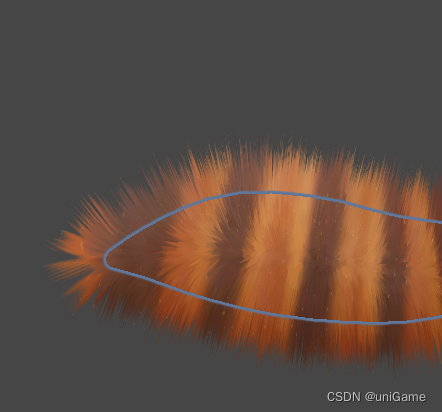
Rendering principle
- Layered shells – each pass represents a fur depth. More shells → richer volume. Areas without fur simply set alpha = 0.
- Noise-driven distribution – sample a noise texture (second UV) to randomize strand density/length. Offset UV per layer to avoid “hedgehog” alignment.
- Lighting & tint – compute colors for root/tip, rim lighting, reflection, etc. to emphasize softness.
Implementation
1. Multi-pass shader
Refactor shared code into FurHelper.cginc. Each pass defines FURSTEP to indicate its depth.
Pass {
    #pragma vertex vert_surface
    #pragma fragment frag_surface
    #define FURSTEP 0.0
    #include "FurHelper.cginc"
}

Pass {
    #pragma vertex vert_base
    #pragma fragment frag_base
    #define FURSTEP 0.05
    #include "FurHelper.cginc"
}
2. Vertex offset (shell extrusion)
v2f vert (a2v v) {
    v2f o;
    float3 offsetVertex = v.vertex.xyz + v.normal * _LayerOffset * _FurLength;
    offsetVertex += mul(unity_WorldToObject, _FurOffset);
    // ... continue with MVP transform
    return o;
}
_LayerOffset– normalized depth of this shell_FurLength– max length control_FurOffset– external forces (gravity, wind) pushing the fur
3. Noise controls transparency
fixed3 noise = tex2D(_FurTex, i.uv.zw).rgb;
fixed alpha = saturate(noise - (_LayerOffset * _LayerOffset + _LayerOffset * _FurDensity));
_FurTexsampled via UV2_FurDensityadjusts how sparse/dense the strands look- Slight UV offsets per layer keep randomness believable
4. Key parameters
- Length (
_FurLength), layer count, densities - Colors: body, root, rim, specular highlights
- Offset controls (
FurForce,FurTenacity) for gravity / wind
Expose them in the material inspector so artists can iterate.
5. C# helper for shells & motion
Let the shader focus on “single shell” rendering while C# instantiates multiple shells and animates them.
void CreateShell() {
    layers = new GameObject[LayerCount];
    float furOffset = 1.0f / LayerCount;
    for (int i = 0; i < LayerCount; i++) {
        GameObject layer = Instantiate(Target.gameObject, Target.transform.position, Target.transform.rotation);
        layer.transform.parent = _parent;
        layer.GetComponent<Renderer>().sharedMaterials = new Material[1];
        layer.GetComponent<Renderer>().sharedMaterial = ResetSharedMaterials(i, furOffset);
        layers[i] = layer;
    }
}
Assign shader parameters per shell:
Material ResetSharedMaterials(int index, float furOffset) {
    Material special = new Material(ShellShader);
    special.SetTexture("_MainTex", Target.sharedMaterial.GetTexture("_MainTex"));
    special.SetColor("_Color",      FurColor);
    special.SetColor("_RootColor",  FurRootColor);
    special.SetColor("_RimColor",   FurRimColor);
    special.SetColor("_Specular",   FurSpecularColor);
    special.SetFloat("_Shininess",  Shininess);
    special.SetFloat("_RimPower",   RimPower);
    special.SetFloat("_FurShadow",  FurShadow);
    special.SetTexture("_FurTex",   FurPattern);
    special.SetFloat("_FurLength",  FurLength);
    special.SetFloat("_FurDensity", FurDensity);
    special.SetFloat("_FurThinness",FurThinness);
    special.SetFloat("_LayerOffset", index * furOffset);
    special.SetVector("_FurOffset", FurForce * Mathf.Pow(index * furOffset, FurTenacity));
    special.renderQueue = 3000 + index;   // avoid depth issues
    return special;
}
Animate the shells with gentle lerps:
void UpdateShellTrans() {
    if (layers == null || layers.Length == 0) return;
    for (int i = 0; i < layers.Length; i++) {
        Transform t = layers[i].transform;
        t.position = Vector3.Lerp(t.position, Target.transform.position, lerpSpeed * Time.deltaTime * 20f);
        t.rotation = Quaternion.Lerp(t.rotation, Target.transform.rotation, lerpSpeed * Time.deltaTime * 10f);
    }
}
This keeps shells slightly trailing behind the main mesh, conveying softness.
References
- “真香预警!新版‘峡谷第一美’妲己尾巴毛发制作分享”
- https://github.com/Sorumi/UnityFurShader
- Fur Tool Unity Asset (ColdFace Interactive)
- https://github.com/Acshy/FurShaderUnity